
Description
DiRoots ProSheets 2.4.2 for unlimited PC
Compatible with Autodesk Revit versions 2018, 2019, 2020, 2021, 2022, 2023, 2024, 2025, 2026, and 2027.
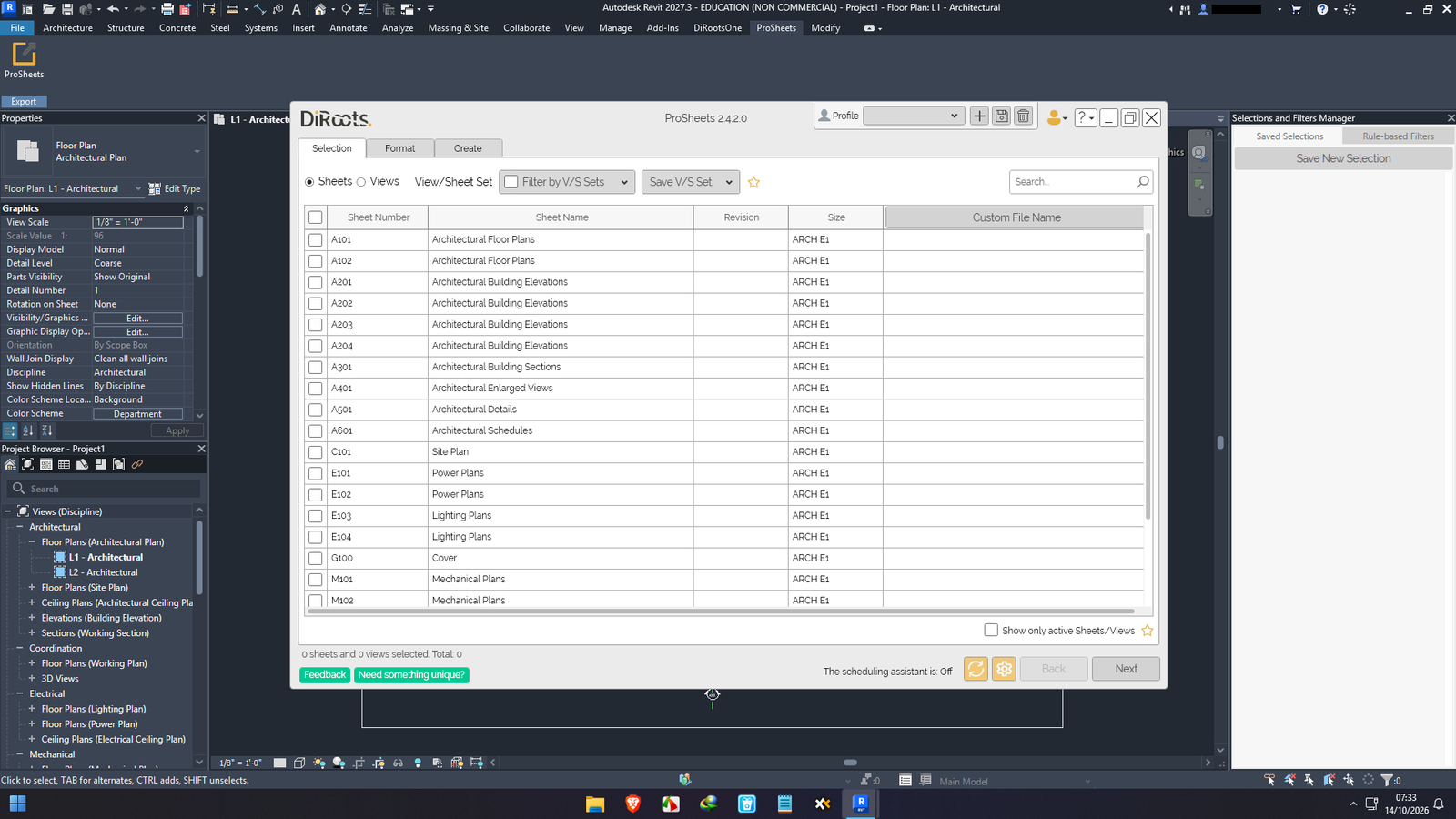
ProSheets is an Autodesk Revit Add-in to export Views and Sheets to PDF, DWG, DGN, DWF, NWC, IFC, IMG (JPEG, PNG, TIFF), Families and Other Styles.
Core Features
- Batch Export Sheets/Views to PDF, DWG, DGN, DWF, NWC, IFC, and IMG (JPEG, PNG, TIFF), Families and Other Styles.
- Auto dectection of paper size and orientation (based on the Title Block family Sheet Width and Height)
- Custom Parametric Filename (e.g., Sheet Name + Sheet Number + Revision Number). Plus: custom parameters and separators
- Save the export settings to Profiles
- Import Profiles from a any location (e.g., shared folder, network location, etc.)
- Schedule prints with date/time and repeat frequency to be made automatically
Version 2.4.2
 Enhancements
- [Create Tab] Improved Publishing Destinations – Destination controls are now enabled only when selected, with clearer behavior matching the Format tab.
- [Autodesk Forma] Improved connector availability messaging – ProSheets now explains when no accessible Forma Hub has an active DiRoots Connector and provides a link to add or activate it.
- [Updated PDF24 components to newer versions for improved compatibility.
 Bug Fixes
- [Autodesk Forma] Renamed folders now display their current names after being renamed in Autodesk Construction Cloud.
- [Autodesk Forma] Exports are now uploaded to the correct renamed folder instead of creating a duplicate folder with the previous name.
Core Premium Features & Automation Toolsets
-
Multi-Format Batch Exporting: Simultaneously convert selected Revit sheets and views into PDF, DWG, DGN, DWF, NWC (Navisworks), IFC, and image formats (JPEG, PNG, TIFF) in one single click.
-
Automatic Sheet Size Detection: Intelligently detects the title block orientation and paper dimensions (A0, A1, A2, A3, A4, or Custom sizes) for every sheet, automatically setting the correct page layout parameters.
-
Custom Naming Parameter Rules: Create sophisticated, automated file-naming conventions using native Revit sheet parameters (e.g., Project Number, Sheet Number, Revision, Drawing Title) separated by custom prefixes, suffixes, or hyphens.
-
PDF Consolidation Options: Choose to export sheets as individual single-page PDF documents or combine selected drawing sets into a single multi-page PDF document.
-
DWG & IFC Export Preset Mapping: Save and load custom DWG export setups (layers, colors, hatch patterns) and IFC configuration presets to maintain strict client or corporate BIM standards.
-
Smart Filtering & Selection Presets: Instantly filter hundreds of project sheets by discipline, phase, parameter values, or custom sheet sets to select exact drawing packages for issuance.
Premium Benefits of Ordering From Us
We understand that tight project submittal deadlines, strict BIM coordination standards, and workflow stability demand absolute software reliability. When you purchase from our store, we guarantee an elite product delivery experience:
-
100% Unrestricted & Stable Performance: We guarantee that this DiRoots ProSheets v2.2.1 release features all premium multi-format batch exporters, custom naming rule builders, and preset managers fully operational.
-
Absolute Session Stability (No Auto-Close Bugs): Engineered to run smoothly inside heavy Revit models. You will never experience sudden software crashes, frozen export loops, or spontaneous auto-closing while batch exporting massive drawing packages.
-
No Expiration Prompts / License Bugs: Pre-validated for permanent, trouble-free local operation. You will never encounter sudden license expiration pop-ups, time-bomb cutoffs, or feature degradation after heavy operational use.
-
Streamlined Professional Deployment: Package includes clean, systematic, step-by-step installation instructions that allow your BIM detailing team or IT staff to deploy the add-in effortlessly.
-
Dedicated Store Technical Support: Should you encounter any local file pathing or Revit environment configuration issues, our support channel is ready to assist you until your export workflow is fully operational.
System Compatibility
| Component | Minimum Requirement | Recommended Specification |
| Host Application | Autodesk Revit 2020 to 2026 / 2027 | Autodesk Revit (Latest Build) |
| Operating System | Windows 10 (64-bit) | Windows 11 (64-bit) |
| Processor (CPU) | Intel Core i5 or AMD Ryzen 5 (2.5 GHz+) | Intel Core i7 / i9 or AMD Ryzen 7 / 9 (Multi-Core) |
| Memory (RAM) | 8 GB | 16 GB or 32 GB (Crucial for fast high-resolution batch rendering) |
| Graphics Card (GPU) | DirectX 11 compliant GPU | Dedicated NVIDIA GeForce / AMD Radeon (4GB+ VRAM) |
| Storage | 1 GB Free Space (Add-in only) | Solid State Drive (SSD / NVMe) for rapid batch PDF caching |
| Display | 1280 x 1024 resolution | 1920 x 1080 (Full HD) or higher |
Perfect For
-
BIM Managers & Coordinators: Enforcing corporate BIM file-naming standards and automating multi-format file exports for clash coordination (NWC/IFC).
-
Architects & Structural Engineers: Publishing complete drawing submittal sets (PDF/DWG) for clients, contractors, and local planning authorities.
-
MEP Consultants & Drafters: Generating multi-page technical drawing packages and sheet deliverables in seconds instead of hours.



Reviews
There are no reviews yet.